Baselines & Visual Diff
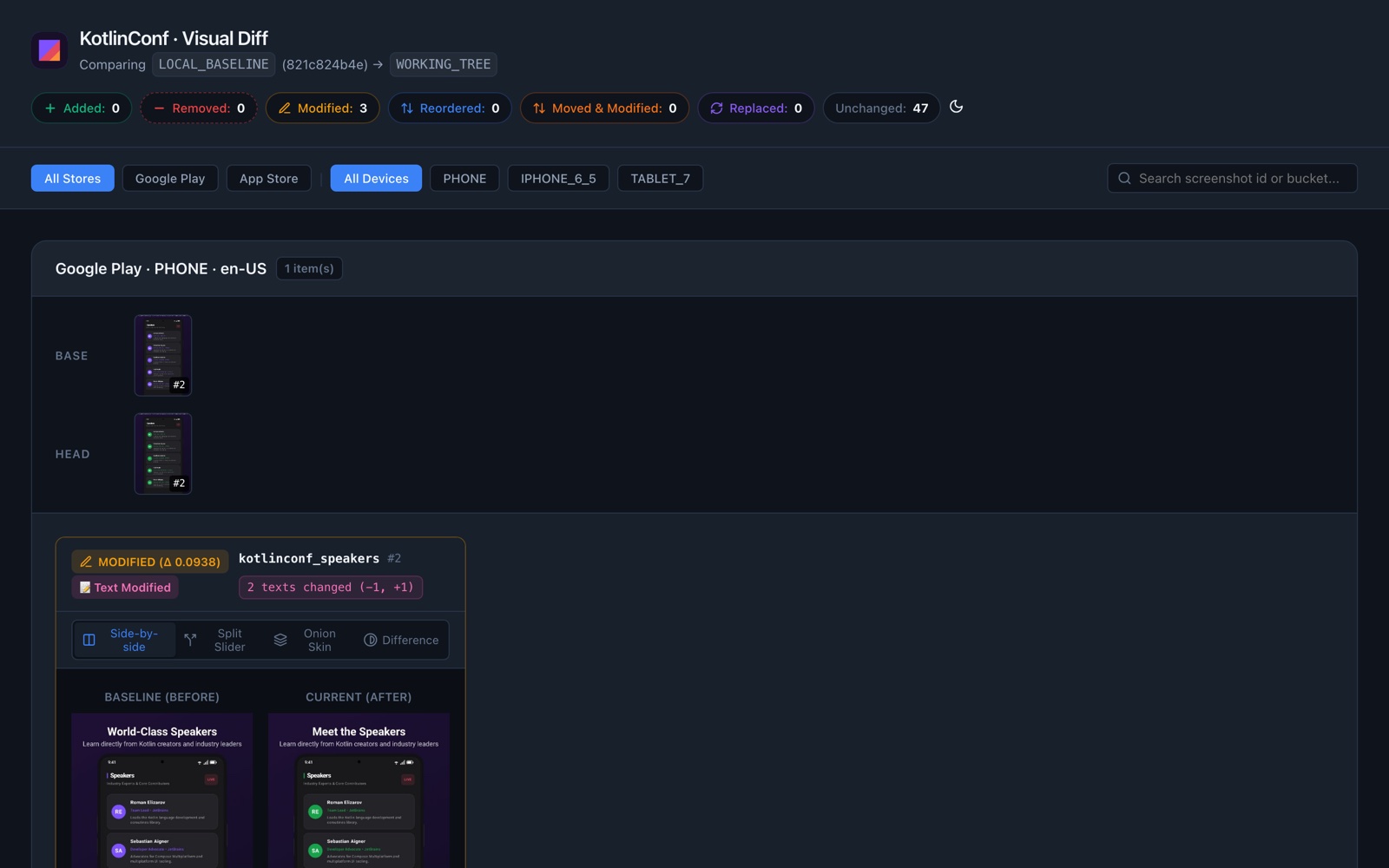
Chameleon Store Studio compares your current screenshots with a base, the version you consider approved, and tells you exactly which images and texts changed, so screenshot changes can be reviewed like code.
Compare on the same machine
Layoutlib renders deterministically: the same code on the same machine produces the same pixels. The same code rendered on macOS, Windows and Linux can still differ by a few pixels, because the native graphics library is built separately for each platform.
So the rule is simple: compare two renders made on the same kind of machine. Store Studio offers three ways to get the base:
| Base | How | Best for |
|---|---|---|
| The base branch, rendered here | storeDiff --render-base |
Local work and CI, with no setup. |
| An export of the base branch | storeDiff --base-export=<dir> |
CI, reusing the export of the last main build. |
| A committed baseline | storeRecordBaseline + .store/baseline.json |
Projects without CI, or a single machine. |
The first two don't require committing anything, and approving a change is simply merging the pull
request: the next build of main becomes the new base.
Render the base branch
# Base: the merge base with origin/main (or main)
./gradlew :app:storeDiff --render-base

# Base: any branch, tag or commit
./gradlew :app:storeDiff --render-base --against=v1.2.0
Store Studio checks out the base revision in a temporary Git worktree, runs this module's
storeExport there once, compares, and removes the worktree. It uses the same Gradle build cache,
so screens that didn't change are usually restored instead of rendered: in the KotlinConf sample the
whole comparison takes about 30 seconds. The base build's log is kept in
build/store/diff/base-render/base-render.log.
local.properties (with sdk.dir) is copied into the worktree, since it isn't committed.
Compare with an existing export
When a CI build of main already produced build/store/export, download it and compare against it
without rendering again:
The path is relative to the root project. You can also set it in the build with
baseline { baseExportDir.set(…) }. See CI Integration for a complete workflow.
Commit a baseline
./gradlew :app:storeRecordBaseline   # approve the current export
git add app/.store/baseline.json
./gradlew :app:storeVerify           # fail if anything changed since
The baseline is a single JSON file with one entry per image: its slot key, position, pixel hash, perceptual hash and captured text. No images are committed. Record and verify it on the same kind of machine; if your team develops on macOS or Windows and CI runs on Linux, prefer rendering the base branch instead.
storeDiff without options compares against the committed baseline at the merge base with
origin/main, or against the file on disk. --against=<ref> (without --render-base) reads the
baseline committed at that ref.
When no baseline has been recorded, storeVerify is skipped with a notice. Set
baseline { required.set(true) } to make it fail instead.
What counts as a change
baseline.comparison |
An image changed when |
|---|---|
STRICT (default) |
any pixel differs, or the captured text differs. |
PERCEPTUAL |
the perceptual distance exceeds perceptualThreshold (0.05), or the captured text differs. |
Use STRICT whenever both sides are rendered on the same kind of machine; it catches every change,
including color-only changes. PERCEPTUAL exists for the case where you can't avoid comparing renders
from different operating systems: it summarizes each image as a 64-bit hash of its grayscale
structure, so it tolerates antialiasing differences but can miss small changes such as a color tweak.
Text changes are detected exactly in both modes, because the text captured while rendering doesn't
depend on the platform.
Diff reports
./gradlew :app:storeDiff          # build/store/diff/diff.json
./gradlew :app:storeDiffReport    # build/store/reports/diff.html + diff-summary.md
Each image is classified as:
| Status | Meaning |
|---|---|
| Added / Removed | The screenshot exists only in the current export or only in the base. |
| Modified | Same slot, different image or text. A text modified tag lists removed and added lines. |
| Reordered | Same image, different order. |
| Moved & Modified | Reordered and changed. |
| Replaced | A different screenshot now occupies the position. |
| Unchanged | Identical. |
The HTML report says what it compared against (for example "main rendered on this machine"),
groups changes by store, device and locale, and offers side-by-side, slider, onion skin and
difference views. Unchanged images are hidden unless you pass --include-unchanged to
exportStoreDiffHtml (or set reports.includeUnchangedInDiff).
diff-summary.md is a compact Markdown summary meant for pull request comments and CI job summaries;
see CI Integration.
Options when another task runs the diff
Command-line options only reach the task you name. When storeDiff runs as a dependency, for
example of storeCi or storeDiffReport, use Gradle properties instead:
| Property | Same as |
|---|---|
-PstoreStudio.diff.renderBase=true |
--render-base |
-PstoreStudio.diff.against=<ref> |
--against=<ref> |
-PstoreStudio.diff.baseExport=<dir> |
--base-export=<dir> |
Shallow clones
Comparing against a ref needs that ref in your clone. In CI, use fetch-depth: 0 (GitHub
Actions) or fetch the branch explicitly; Store Studio tells you when the clone is too shallow.
In the IDE
The Changes & Diff tab shows the same comparison with a slider. It can compare against the committed baseline or render the base branch on your machine.